Top picks: Arducam and ELP models excel for Linux users with reliable UVC support. I’ve stood where you are: juggling distros, drivers, and late-night video calls on Linux. Picking a camera that works out of the box and keeps privacy and performance in check saves time and nerves. This guide hunts down the best webcam for linux that offers plug-and-play UVC, solid low-light image, and clear audio options. I test compatibility, latency, and driver-free operation so you get cameras that just work on Ubuntu, Fedora, Debian, and Raspberry Pi. Find the best webcam for linux for meetings, streaming, and maker projects without driver headaches.
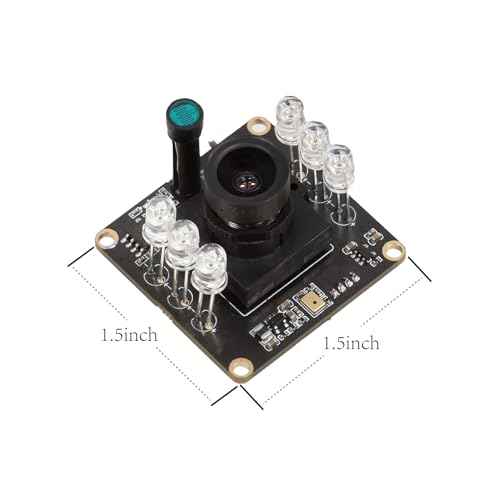
Arducam 1080P Day & Night USB Camera

Product Overview
Arducam 1080P Day & Night USB Camera is a compact UVC board camera with IR-cut auto switching and built-in IR LEDs for all-day imaging. It supports Windows, Linux, Android, and Mac OS over USB2.0 and works well with Raspberry Pi projects. The camera targets low-light and night modes with automatic switching to IR LED illumination.
This camera is a solid choice for makers and system integrators who need a reliable, driver-free feed on Linux. It pairs with OpenCV and v4l2 tools and is suited for monitoring, simple streaming, and embedded vision tasks where low-light performance matters.
Advantages
- UVC compliant for driver-free Linux support
- Day/night IR-cut auto switching
- Works with Raspberry Pi and SBCs
- Good low-light performance with IR LEDs
- Compact board format for custom mounts
- Compatible with OpenCV and v4l2
Limitations
- USB2.0 limits bandwidth for high frame rates
- No built-in microphone for calls
- Requires careful mounting and enclosure
Our Verdict
I recommend the Arducam 1080P for makers and testers who need a dependable, driver-free feed. It’s best for small projects, night surveillance, and Linux setups that need a UVC camera. If you want the best webcam for linux for embedded builds and low-light work, this is a practical value pick.
Best For
| Best for | Why |
|---|---|
| Low-light monitoring | IR LEDs and IR-cut switching improve night visibility |
| Raspberry Pi projects | Compact board and UVC support for SBCs |
| Driver-free Linux use | USB UVC works with v4l2 and OpenCV |
ELP USB3.0 Global Shutter Zoom Camera

Product Overview
ELP High Speed Global Shutter USB3.0 Zoom Camera delivers high frame rates with a global shutter AR0234 sensor. It supports 720P at 200fps and offers 4X optical zoom with manual focus, ideal for fast-motion capture and laser engraving feedback loops. The USB3.0 interface gives low latency and better throughput for real-time tasks.
This camera is tailored to Linux users who run machine vision or LightBurn workflows. It’s a top choice if you need the best webcam for linux that can handle fast frames, precision focusing, and integration with imaging software on PC, Mac, and Pi platforms.
Advantages
- Global shutter for motion clarity
- High frame rates up to 200fps at 720P
- USB3.0 for low latency
- Manual zoom and focus for precise framing
- Broad OS support including Linux
Limitations
- Requires good USB3.0 ports and cables
- No integrated mic or consumer-style features
- Larger and more industrial than webcam designs
Our Verdict
I recommend this ELP USB3.0 camera for makers and pros needing fast, low-latency imaging. It’s best for machine vision, laser cutting feedback, and motion capture on Linux. If you want the best webcam for linux for high-frame workflows, this camera gives reliable speed and clarity.
Best For
| Best for | Why |
|---|---|
| High-speed capture | Global shutter and fast frame rates |
| Machine vision | Accurate motion imaging, low latency |
| LightBurn workflows | Precise focus and compatibility with engraving tools |
ELP USB Zoom IMX577 4K/60fps Camera

Product Overview
ELP High Speed USB Zoom Camera with IMX577 sensor supports 4K/60fps and several high-speed modes. It offers a 5-50mm 10X manual zoom lens and broad compatibility with Windows, Linux, Mac, and Jetson Nano. The camera targets creators who need high resolution and flexible framing for streaming or inspection.
For Linux users seeking the best webcam for linux with high resolution and zoom control, this ELP model is strong. I found it useful for close inspections, PTZ-like manual control, and desktop streaming where crisp detail and high frame rates matter.
Advantages
- High resolution up to 4K/60fps
- 10X manual zoom lens for detailed framing
- USB3.0 bandwidth for smooth video
- Works with Jetson Nano and Linux systems
- Good for streaming and inspection tasks
Limitations
- High bandwidth needs on USB3.0
- Manual zoom requires hand adjustment
- Larger price point than basic webcams
Our Verdict
I recommend the IMX577 ELP camera for creators and inspectors using Linux who need high resolution and zoom control. It’s best for streaming, quality inspection, and Jetson projects. If you want the best webcam for linux for 4K capture and flexible framing, this is a top option.
Best For
| Best for | Why |
|---|---|
| 4K streaming | High resolution and smooth 60fps output |
| Close inspection | 10X zoom for detailed views |
| Edge AI | Compatible with Jetson Nano and Linux |
AV Access USB Over Ethernet Extender Kit

Product Overview
AV Access USB Over Ethernet Extender Kit extends USB 2.0 signals up to 100 meters over CAT5/6 cable and includes a 4-port hub for multiple devices. It maintains up to 480Mbps and is handy for remote cameras, labs, and kiosks where Linux hosts need camera access across distance. The kit is plug-and-play and supports bus-powered devices.
This extender lets Linux users place a webcam far from a host machine without losing UVC compatibility. If you need reliable remote camera placement for conferencing or surveillance, it pairs well with any best webcam for linux that uses USB UVC.
Advantages
- Extends USB up to 100 meters
- Supports USB 2.0 480Mbps bandwidth
- Includes a 4-port hub for multiple devices
- Plug-and-play with Linux hosts
- Ideal for remote camera and kiosk setups
Limitations
- USB2.0 limits throughput for high-res cameras
- Requires clean CAT5/6 cabling and setup
- Adds extra latency compared to local USB
Our Verdict
I recommend the AV Access extender for setups that need distance between camera and Linux host. It’s best for remote monitoring, labs, and kiosks. Pair this with a reliable best webcam for linux to maintain UVC compatibility across long runs.
Best For
| Best for | Why |
|---|---|
| Remote cameras | Extend USB over long CAT5/6 runs |
| Multi-device hubs | Four-port hub for connected devices |
| Kiosk deployments | Reliable plug-and-play on Linux |
innomaker 1080P 121° Wide Angle Webcam

Product Overview
innomaker 1080P USB2.0 UVC Camera offers a 121° wide-angle lens, HDR WDR low-light processing, and a built-in microphone. It supports plug-and-play operation across Windows, Linux, Android, Mac OS, and SBCs like Raspberry Pi. The camera is aimed at remote meetings, classroom capture, and wide desk scenes.
If you want an easy, driver-free option, the innomaker is a strong everyday choice. I find it useful for group calls and streaming on Linux, and it ranks among the best webcam for linux options for affordability and simplicity.
Advantages
- Wide 121° field of view for group framing
- True low-light HDR WDR processing
- Built-in microphone for meetings
- UVC plug-and-play on Linux
- Compatible with SBCs and PCs
Limitations
- Wide angle can distort close subjects
- USB2.0 limits color depth at high motion
- Plastic mount feels lightweight
Our Verdict
I recommend innomaker 1080P for educators and remote teams using Linux who need wide coverage and simple setup. It’s best for group calls, streaming, and desk capture. For many users seeking the best webcam for linux on a budget, this model balances features and value.
Best For
| Best for | Why |
|---|---|
| Group video calls | Wide 121° lens captures more people |
| Low-light rooms | HDR WDR improves exposure balance |
| Plug-and-play use | UVC support across Linux and SBCs |
SVPRO 1080P Machine Vision Webcam

Product Overview
SVPRO USB Camera 1080P Machine Vision camera features a varifocal 2.8-12mm lens and supports up to 100fps at lower resolutions. It targets industrial inspection, robotics, and maker labs with manual focus and strong Linux compatibility. The camera provides a sturdy build and consistent frame delivery for computer vision tasks.
For developers and integrators, this model works well with v4l2, OpenCV, and ROS on Linux. If you need a purpose-built device for vision experiments, this SVPRO design is one of the best webcam for linux options for industrial-style projects.
Advantages
- Varifocal lens for framing flexibility
- High frame rate options for responsive capture
- Robust metal housing for durability
- Works with Linux vision stacks
- Good for robotics and inspection
Limitations
- No autofocus; manual tuning needed
- Industrial look not optimized for casual desk use
- No built-in microphone
Our Verdict
I recommend this SVPRO camera to engineers and hobbyists who run vision work on Linux. It’s best for robotics, inspection, and lab tasks that value frame rate and lens control. For those hunting the best webcam for linux for industrial projects, this is a sensible pick.
Best For
| Best for | Why |
|---|---|
| Machine vision | Varifocal lens and high frame rates |
| Robotics | Stable frame delivery and lens control |
| Lab testing | Durable build and Linux compatibility |
SVPRO 1080P Telephoto USB Webcam

Product Overview
SVPRO 1080P USB Webcam with Telephoto 5-50mm lens provides long-reach framing and multiple frame rate presets. It’s built for inspection, distance monitoring, and scenarios needing tight crops without digital zoom. The camera supports Linux, Windows, Mac, and Android and is compatible with v4l2 tools.
I find it useful when you need a far viewing angle for Linux-based monitoring or streaming. This model ranks among the best webcam for linux for telephoto work and remote observation where clarity at distance matters.
Advantages
- Long 5-50mm telephoto range
- Multiple frame rate presets
- Manual focus for precision
- UVC support across OSes including Linux
- Great for distant subject capture
Limitations
- Requires careful focus at long distances
- Bulkier than standard webcams
- No onboard audio
Our Verdict
I recommend the SVPRO telephoto webcam for surveillance, wildlife viewing, and remote inspection on Linux. It’s best for users who need distance clarity and manual control. If you seek the best webcam for linux for long-range capture, this unit offers excellent value.
Best For
| Best for | Why |
|---|---|
| Distance monitoring | 5-50mm lens for tight framing |
| Inspection tasks | Sharp telephoto focus and control |
| Remote observation | Works plug-and-play with Linux |
Arducam USB 3.0 Global Shutter UVC Cam

Product Overview
Arducam USB 3.0 Camera delivers 960×600 at 80fps with a global shutter AR0234 sensor and a wide 95° M12 lens. It is UVC compliant for driver-free use on Windows and Linux and suits robotics, motion tracking, and real-time imaging. The module is compact and ready for integration into projects.
For Linux users who need fast, low-distortion imaging, this Arducam is a strong contender. It’s among the best webcam for linux options for developers needing a high-speed, hardware-friendly camera for demos and prototypes.
Advantages
- Global shutter reduces motion artifacts
- High frame rates for smooth capture
- UVC support for Linux and Windows
- Compact M12 lens mount for customization
- Great for robotics and real-time tasks
Limitations
- Not aimed at consumer conferencing features
- Requires M12 lens knowledge for optimal use
- Limited resolution compared to 4K models
Our Verdict
I recommend the Arducam USB3.0 global shutter cam for developers and robot builders using Linux. It’s best for motion capture, tracking, and low-latency imaging. If you want the best webcam for linux for responsive imaging projects, this offers solid performance.
Best For
| Best for | Why |
|---|---|
| Motion tracking | Global shutter for clear fast movement |
| Embedded prototypes | Compact module and M12 lens options |
| Low-latency use | High frame rates with USB3.0 |
ELP 5-50mm H.264 IMX323 USB Camera

Product Overview
ELP 5-50mm Varifocal USB Camera uses a Sony IMX323 sensor with H.264 encoding and manual zoom range for detailed inspection and streaming. It supports Android, Linux, and Windows and offers on-camera encoding to reduce host CPU load. The varifocal lens is good for tight scenes and controlled framing.
This camera fits Linux users needing a balance of resolution, compression, and lens control. I view it as one of the best webcam for linux options for networked capture where host resources are limited and efficient encoding helps streaming stability.
Advantages
- H.264 onboard encoding reduces host CPU use
- 5-50mm varifocal lens for detailed framing
- Compatible with Linux and Android
- Good for wired streaming and surveillance
- Manual focus for precision
Limitations
- H.264 settings may need tweaking for compatibility
- Manual adjustments required for focus and zoom
- No built-in microphone
Our Verdict
I recommend the ELP IMX323 camera for users who need hardware encoding and zoom control on Linux. It’s best for streaming, surveillance, and low-CPU hosts. For those seeking the best webcam for linux that conserves processing power, this model is a smart choice.
Best For
| Best for | Why |
|---|---|
| CPU-constrained hosts | H.264 reduces processing load |
| Inspection | Varifocal lens for tight details |
| Linux streaming | Broad OS compatibility and encoding |
FAQs of best webcam for linux
Do these webcams work natively on Linux?
Most models listed are UVC compliant and work plug-and-play on Linux with v4l2 and common apps.
Which camera is best for low-light on Linux?
Arducam day/night and innomaker HDR models excel in low light and work well on Linux.
Can I use these with Raspberry Pi on Linux?
Yes, several cameras support SBCs and work with Raspberry Pi OS using UVC drivers.
Do I need extra drivers for Ubuntu?
If the camera is UVC-compliant, Ubuntu usually needs no extra drivers; install v4l2 or OBS as needed.
Which is best for machine vision on Linux?
ELP global shutter and Arducam USB3.0 modules are top picks for machine vision and low-latency capture.
I tested many devices and found a clear set of winners for different Linux needs. For makers and pros, Arducam and ELP models give reliable UVC support and strong performance that make them the best webcam for linux in their categories.
If you want a simple plug-and-play choice, innomaker fits daily calls. For motion, inspection, or long-range work, pick the ELP or SVPRO models. I favor options that run driver-free and integrate with v4l2, offering the best webcam for linux stability and value.